The ADC Registration Portal is the online platform for Nigerians who want to register with the African Democratic Congress, a political party in Nigeria. It helps interested members access the registration page, login area, membership form, and basic party registration information. People are searching for it because political party registration is becoming more digital, and many Nigerians want a simple guide on how to join, verify, or complete their ADC membership registration correctly.
This guide explains the ADC portal, login process, registration form PDF, how to apply, and what to know about the 2026 deadline. This is not a job recruitment guide. It is about ADC political party membership registration.
Before you proceed, we wrote an article about Nigeria Police Force Recruitment: How to Print Your Slip (PDF Download) which we think might be important to you.
What is the ADC Registration Portal?
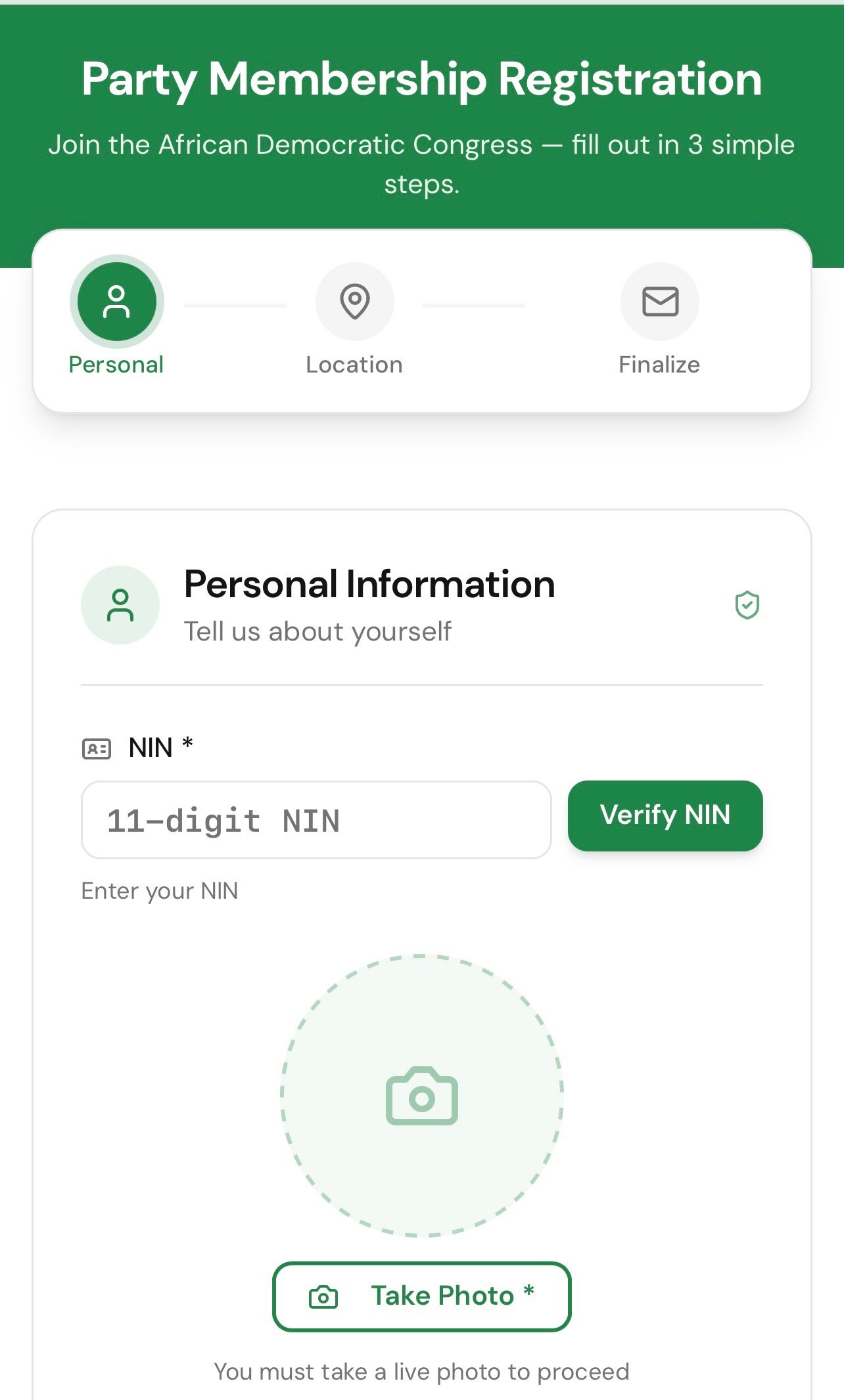
The ADC Registration Portal is the official online platform used for ADC membership-related registration. It may allow users to register as members, aspirants, delegates, or support groups, depending on the options available on the portal at the time.
For a normal person who simply wants to join ADC, the most relevant option is usually membership registration. This means you are submitting your personal and political location details so the party can add you to its membership structure.
The portal makes the process easier because users do not always have to depend only on paper forms or physical party offices. However, if online registration is not working or available in your area, you may still need to contact a recognized ADC office at the ward, local government, state, or national level.
What is the ADC Login Portal used for?
The ADC Login Portal is where registered users can sign in after creating an account. In most cases, the login page requires an email address and password. Some portals may also provide a Forgot Password option for users who cannot remember their password.
The login section is mainly useful after registration. It may help users return to their account, continue an unfinished registration, check membership details, or access available member services.
If you have not registered before, do not start from the login page. Start from the registration page first. After completing registration, you can then use the login section when needed.
If you cannot login, check that your email address is correct, your password is typed properly, and your account was successfully created. If the portal has a password reset option, use it instead of trying too many wrong passwords.
What is the ADC Registration Form PDF?
The ADC Registration Form PDF is a downloadable membership form used by people who want to register with the African Democratic Congress. It usually collects basic information such as your name, phone number, state, local government, ward, polling unit, address, occupation, and other membership details.
The PDF form is useful for people who prefer offline registration or those who are asked by a party office to fill a printed copy. In some cases, a member may download the form, fill it, print it, and submit it to an ADC office or authorized party representative.
Before using any PDF form, make sure it comes from an official or recognized ADC source. Avoid random forms shared in WhatsApp groups or unknown websites, especially if they ask for sensitive information or payment.
Below is a Google drive link containing the ADC membership registration form for offline use.
How do you register on the ADC Registration Portal?
To register on the ADC Registration Portal, visit the official registration page and choose the correct registration category. For most new members, this will be member registration or membership registration.
A simple registration process may look like this:
- Open the official ADC registration portal.
- Select the correct category, such as member, aspirant, delegate, or support group.
- Enter your full name and personal details.
- Provide your state, local government, ward, and polling unit.
- Add your phone number and email address where required.
- Create a password if the portal asks you to create an account.
- Review your information carefully.
- Submit the form and save any confirmation details.
Do not rush the process. Your ward, local government, and polling unit are important because political party membership is often organized from the grassroots level. If you enter the wrong ward or polling unit, it may affect your membership record or future participation in party activities.
How do you apply on the ADC Portal?
To apply on the ADC Portal, you need to understand that “apply” here does not mean applying for a job. It means applying or registering under a party-related category.
For ordinary members, applying simply means completing the ADC membership registration form. You provide your details, accept the membership requirements, and submit the form.
For aspirants, delegates, or support groups, the process may be different. These categories may have extra instructions, depending on party guidelines, congress activities, internal elections, or official notices.
If you only want to become a regular ADC member, choose the ordinary membership option. Do not select aspirant or delegate registration unless you understand what that category requires.
What details are needed for ADC registration?
The details needed for ADC registration are usually basic personal and political location details. These may include:
- Your full name
- Your phone number
- Your email address
- Your age or date of birth
- Your gender
- Your occupation or profession
- Your state of residence
- Your local government area
- Your ward
- Your polling unit
- Your residential address
Use correct and consistent information. Your name should be written the same way you use it on important documents. Your phone number should be active because party updates may be sent through calls or text messages.
Your ward and polling unit should not be guessed. If you are not sure, check your voter card or confirm from a reliable source before submitting the form.
Is ADC registration free?
ADC membership registration is generally expected to be free for ordinary members when the party opens online registration. However, political parties may have separate dues, levies, nomination fees, or internal payments for specific roles or activities.
This means you should not confuse basic membership registration with aspirant fees, party dues, or special political processes.
Be careful if someone asks you to pay money privately before registering. Do not send money to unknown agents, unofficial WhatsApp contacts, or random bank accounts. If any payment is required for a specific ADC process, confirm it through an official party channel first.
What is the deadline for ADC registration 2026?
The ADC registration deadline for 2026 depends on the specific registration exercise and the category you are applying under. There may not be one general deadline for every member, aspirant, delegate, or support group.
For ordinary membership registration, the portal may stay open for a longer period, depending on the party’s decision. For aspirant or delegate registration, the deadline may be stricter because it can be connected to congresses, primaries, internal elections, or official party timetables.
The best thing to do is to check the official ADC portal or contact a recognized ADC office for the current deadline. If the portal displays a closing date, follow that date. If no deadline is shown, register early instead of waiting until political activities become busy.
Who can register as an ADC member?
ADC registration is mainly for Nigerians who want to join the African Democratic Congress and participate in its political activities. A person registering should be willing to identify with the party and accept its constitution, manifesto, and programme.
You may register if you want to become an ordinary member, support the party in your ward, join local party activities, or prepare for deeper participation in the party later.
Joining a political party should be a personal decision. Before registering, learn about ADC’s values, public activities, leadership, and political direction. Do not register only because someone pressured you.
What are common ADC registration mistakes?
Common ADC registration mistakes include using the wrong portal, entering incorrect details, selecting the wrong category, or submitting duplicate forms.
One common mistake is treating the ADC portal like a job recruitment portal. It is not. You do not need a CV, cover letter, or employment history for ordinary membership registration.
Another mistake is guessing your ward or polling unit. These details matter in political registration. If you are unsure, confirm before submitting.
Also avoid using fake links. Political registration can involve personal details, so only use official or trusted ADC channels. Do not submit your information on suspicious websites.
Is the ADC Registration Portal safe?
The ADC Registration Portal is safe to use when you are on the official platform and you protect your personal information. However, users still need to be careful because fake websites and fake agents can appear during political seasons.
Do not share your password with anyone. Do not register through unknown links. Do not send your personal details to strangers claiming to be party officials unless you can verify them.
If you are using a public computer or cybercafé, do not save your password on the browser. After registration or login, always log out.
How do you verify your ADC registration?
To verify your ADC registration, check if the portal has a verification section. You may be asked to enter your phone number, email address, registration number, or another detail used during registration.
After registering, save your confirmation message, membership number, screenshot, or any proof shown on the portal. This can help if you need to confirm your registration later.
If your details do not appear during verification, check whether you entered the correct phone number or email address. If the problem continues, contact a recognized ADC office at your ward, local government, state, or national level.
What should you do before the ADC registration deadline?
Before the ADC registration deadline, make sure your form is complete, your details are correct, and your registration has been submitted through the right channel.
Check your name, phone number, state, local government, ward, and polling unit before submitting. Save your confirmation details after registration. If you used the PDF form, make sure it has been submitted to the proper party office, because filling the form alone does not complete registration.
The safest approach is to register early, verify your details where possible, keep your login information safe, and follow only official ADC updates. This helps you avoid fake portals, missed deadlines, wrong information, and unnecessary mistakes during the registration process.
Be the first to comment